
In IT support, the continued adoption of technology in all areas of the business means companies are running hundreds of applications. That is a very heavy lift for internal IT support teams. Generative AI offers a transformative approach to IT Helpdesk tasks. By leveraging large language models like GPT-based models, generative AI can produce human-like text in response to provided prompts. This innovation holds significant potential for automating responses, expediting ticket resolution, and improving overall efficiency within IT Helpdesk teams. In this blog, we’ll delve into the workings of generative AI and its implications for the future of IT support.
The Overwhelming Tide of Customer Queries
For many companies, especially those with high customer interaction volumes, the helpdesk serves as the central hub for addressing internal employee IT inquiries. It’s a critical area where efficiency is key, and time constraints are significant. Any time that employees spend hunting for answers is time where they are not productive and doing the work they need to do. There are many challenges here. There’s the sheer volume of inquiries. Employee requests, spread across a variety of complexities, can inundate support reps, leaving them overwhelmed and sometimes struggling to keep pace. This can result in delays and dissatisfaction among clients.
Additionally, there’s the challenge of knowledge retrieval. Even the most seasoned support professional may not have immediate recall of nuanced product specifications or the latest fixes. The ability to swiftly access and utilize relevant information is crucial for providing accurate and timely resolutions. Enter the Internal Helpdesk Chatbot, positioned to revolutionize the support landscape by addressing these challenges.
A Personal Assistant for Your IT Support Reps
The Internal Helpdesk Chatbot helps support agents, offering indispensable assistance throughout their daily work. Unlike its counterparts designed for customer-facing interactions, this specialized AI tool is tailored specifically to empower and enhance the internal support team’s capabilities.
Equipped with generative AI, the IT chatbot retrieves knowledge from your company’s library of IT help information. When faced with a question, support agents no longer need to manually scour through countless documents or sift through endless emails for relevant information. Instead, with a simple prompt, the chatbot locates the information required to address the employee’s concern. Whether it’s a product specification, troubleshooting guide, or latest update, the chatbot delivers the information quickly, freeing up valuable time for support agents and employees to continue with other work.
In addition, the chatbot’s utility extends beyond mere information retrieval. It serves as a proactive assistant, capable of drafting responses and disseminating announcements to streamline communication within the support team. Need to notify all employees about an upcoming system maintenance? The chatbot takes care of it, ensuring that every member of the team is promptly informed.
Essentially, the chatbot acts as a repository of institutional knowledge, continuously learning and adapting to the evolving needs of the support team. It not only provides immediate assistance but also serves as a valuable resource for ongoing training and upskilling initiatives. As support agents interact with the Chatbot, it gathers insights into common issues, frequently asked questions, and emerging trends, enabling the team to refine their processes and improve their service delivery over time.
In essence, the Internal Helpdesk Chatbot isn’t just a tool—it’s a strategic asset that revolutionizes the way support agents operate, empowering support agents to excel in their roles.
What Can a Generative AI Chatbot Do?
A GPT-style generative AI, with its ability to understand and generate human-like text based on prompts, offers a plethora of benefits for IT Helpdesk teams. Let’s delve into three specific scenarios where such AI can significantly assist employees in resolving common technical issues.
1. Troubleshooting Windows Errors:
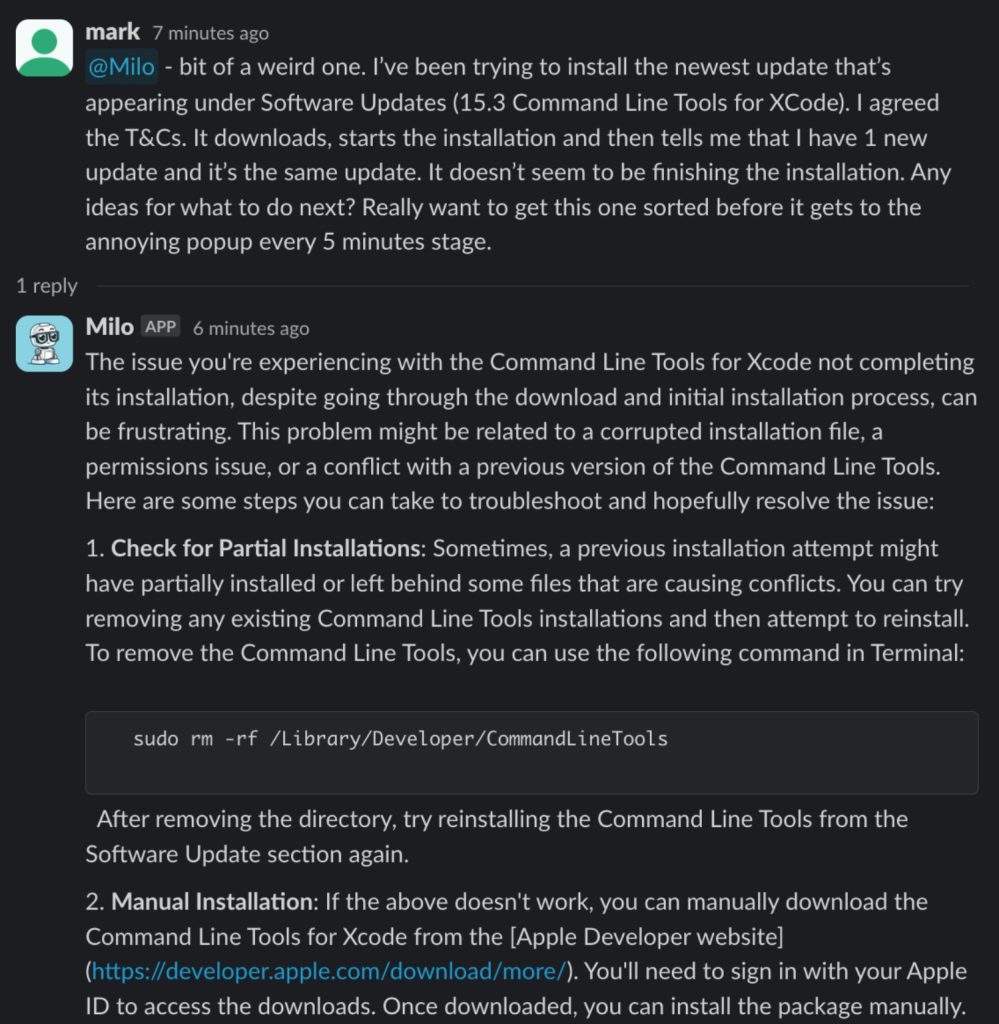
Imagine an employee encountering a perplexing Windows error message on their laptop, hindering their workflow. Instead of spending valuable time searching through online forums or contacting IT support, they can turn to the company’s GPT-style generative AI for immediate assistance. By describing the error message in simple terms, the employee prompts the AI to provide step-by-step troubleshooting instructions tailored to their specific issue. For instance, the AI might recommend performing a system restore, checking for software updates, or running diagnostic tools to identify the root cause of the error. With the AI’s guidance, the employee can swiftly resolve the issue and resume their tasks without extensive downtime or frustration.
The following example from Hyacinth AI goes pretty far into the weeds, and you can see that the AI can respond with help and even command line codes to use.
2. Configuring Email Settings
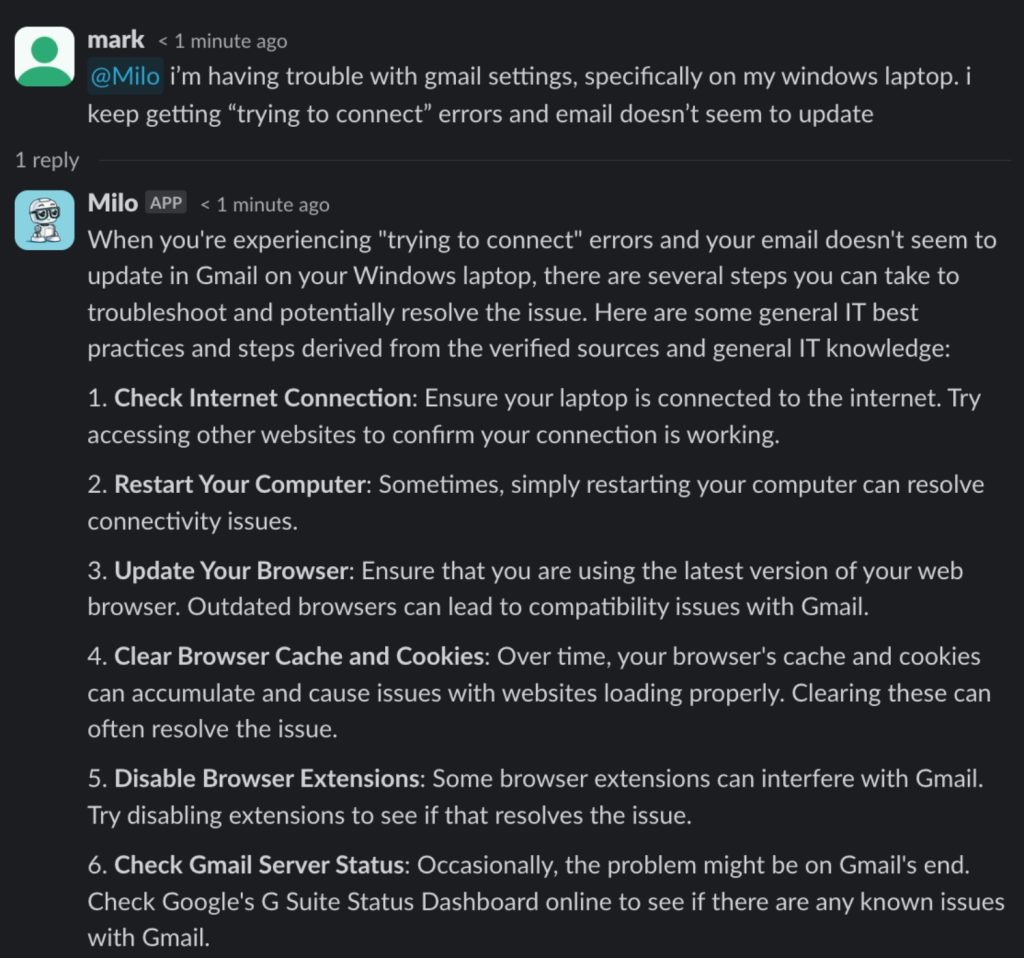
Another common scenario involves employees struggling to configure email settings on their devices, whether it’s setting up a new email account or troubleshooting connectivity issues. Instead of reaching out to IT support for assistance, employees can leverage the company’s generative AI to guide them through the process. By providing details about their email provider and device model, along with any error messages they encounter, the AI can generate customized instructions to help them configure their email settings correctly. From adjusting server settings to verifying account credentials, the AI walks employees through each step, empowering them to resolve the issue independently and regain access to their email accounts promptly.
3. Setting up an Employee’s VPN:
Picture an employee working remotely and needing to access their company’s network securely via a VPN (Virtual Private Network). However, they’re unsure how to configure the VPN settings on their device, leading to frustration and potential productivity delays. In this scenario, the employee can turn to the company’s generative AI for guidance. By describing their device type, operating system, and VPN provider, along with any error messages encountered during setup, the employee prompts the AI to generate tailored instructions for configuring the VPN. The AI may provide step-by-step guidance on accessing the network settings, entering server details, and verifying authentication credentials. With the AI’s assistance, the employee can quickly and confidently set up the VPN connection, ensuring secure access to company resources while working remotely.
Below is a sample interaction where an employee asks for help setting up their VPN. The response is based on the company’s IT documentation and entirely automated:
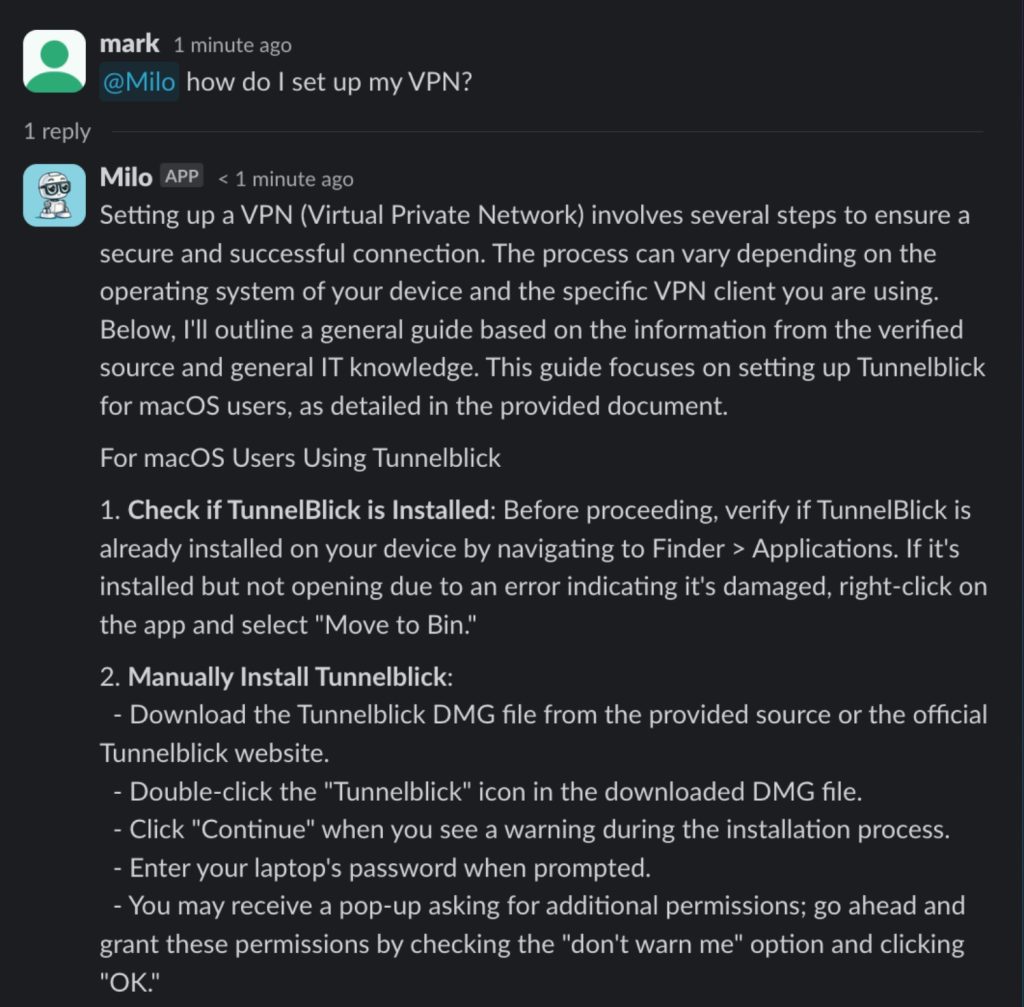
In each of these scenarios, a GPT-style generative AI proves invaluable in empowering employees to troubleshoot common technical issues independently and efficiently. By providing personalized guidance and actionable instructions, the AI enhances productivity, reduces reliance on IT support, and fosters a culture of self-sufficiency within the organization.
What Can’t It Do?
While a GPT-style generative AI offers remarkable capabilities in understanding and generating human-like text, it’s essential to recognize its limitations. One key aspect to understand is that AI, including generative models, lacks genuine comprehension or consciousness. It can mimic human language patterns and generate responses based on patterns in its training data, but it does not possess true understanding or awareness. Consequently, there are certain tasks and scenarios where AI falls short. For instance, complex problem-solving requiring abstract reasoning, emotional intelligence, or moral judgment remains beyond the capabilities of current AI technology. Similarly, tasks requiring physical manipulation or sensory perception, such as conducting hands-on repairs or assessing the physical condition of equipment, are outside the realm of what a GPT-style generative AI can accomplish. It’s important for users to temper their expectations and understand that while AI can be incredibly useful in many contexts, it cannot perform magic and is not a substitute for human expertise and judgment in all situations.
For example:
- Critical Thinking and Problem-Solving
While a GPT-style generative AI excels at processing and generating text based on patterns in its training data, it lacks the ability for critical thinking and complex problem-solving. For instance, when faced with novel or ambiguous situations that require abstract reasoning and creative problem-solving skills, the AI may struggle to generate meaningful or innovative responses. Consider a scenario where an IT Helpdesk team encounters a unique technical issue with no precedent in their documentation. In such cases, human intervention and critical thinking are essential to analyze the problem, devise a solution, and implement necessary adjustments—tasks that go beyond the capabilities of AI.
- System Administration and Server Management:
Generative AI lacks the ability to perform system administration tasks and manage server infrastructure effectively (at this time). Tasks such as configuring servers, managing user accounts, or monitoring system performance require deep knowledge of operating systems, networking, and security principles. System administrators utilize their expertise to ensure the reliability, security, and performance of IT systems and infrastructure, tasks that AI cannot fully automate without human oversight and intervention. In addition, at this point in time, most companies will still want humans, who can exercise judgment, to have their hands at the controls.
- Physical or Manual Tasks
GPT-style generative AI operates solely in the realm of text-based communication and lacks the ability to interact physically with the environment. For instance, tasks such as conducting hands-on repairs, assessing the physical condition of hardware, or troubleshooting network connectivity issues that require physical manipulation or sensory perception are beyond the capabilities of AI. In scenarios where a technician needs to physically inspect equipment or perform intricate repairs, human expertise and dexterity are indispensable. AI cannot replace the tactile and sensory capabilities of human technicians in these situations.
Recognizing these limitations is crucial for managing expectations and ensuring that AI is used appropriately, complementing human expertise rather than serving as a substitute for it.
Implementation and Adoption
Implementing a GPT-style IT Support Helpdesk chatbot requires planning, preparation, and execution to ensure its effectiveness and seamless integration into existing workflows.
- Define objectives and scope: Clearly outline the tasks and inquiries the chatbot will handle, such as troubleshooting assistance and answering FAQs.
- Select a suitable GPT-style generative AI model: Choose a model based on language capabilities, response accuracy, and scalability.
- Train the model: Provide relevant data, including past support tickets and documentation, to enhance the chatbot’s understanding and generate accurate responses.
- Integrate with existing IT systems: Ensure seamless communication and ticket management by integrating the chatbot with existing IT systems and ticketing platforms.
- Select the interface: Implement an accessible interface for employees to interact with the chatbot, such as a web portal, messaging app like Slack or Teams, or voice interface.
- Monitor and evaluate performance: Regularly analyze user feedback and refine responses based on real-world interactions to improve the chatbot’s performance.
- Provide training and support: Offer adequate training and support for IT Helpdesk staff and end-users to ensure successful adoption and utilization of the chatbot.
How to Encourage Employees to Adopt a Helpdesk Chatbot
Driving employee adoption of an IT Support Helpdesk chatbot involves several strategies aimed at increasing awareness, demonstrating value, and fostering a positive user experience. Here are some effective approaches:
- Communication and Education: Clearly communicate the benefits of the chatbot to employees through various channels, such as email announcements, intranet posts, and training sessions. Explain how the chatbot can save time, provide quick solutions to common issues, and improve overall efficiency in accessing IT support.
- Demonstrate Value: Showcase the chatbot’s capabilities through interactive demonstrations or tutorials. Highlight specific scenarios where the chatbot can assist employees, such as troubleshooting technical issues, accessing knowledge resources, or submitting IT support tickets seamlessly.
- Incorporate Feedback: Actively solicit feedback from employees regarding their experience with the chatbot. Use this feedback to identify areas for improvement and refine the chatbot’s functionality and responses accordingly. Employees are more likely to adopt a tool that addresses their needs and concerns effectively.
- Provide Easy Access: Ensure that the chatbot is easily accessible to employees through multiple channels, such as company intranet, messaging apps, or dedicated chat interfaces. Integrate the chatbot into existing workflows and platforms that employees already use regularly to facilitate seamless interaction.
- Continuous Promotion: Maintain visibility of the chatbot by periodically reminding employees of its availability and capabilities. Use regular communications, such as monthly newsletters or company-wide announcements, to highlight new features, tips for using the chatbot effectively, and success stories from other users.
- Lead by Example: Encourage leaders and managers within the organization to lead by example and actively use the chatbot themselves. When employees see leadership embracing the technology, they are more likely to follow suit and integrate it into their own workflows.
Overcoming Resistance to Change
Overcoming employee resistance to change when adopting a chatbot for IT Support Helpdesk requires a combination of proactive communication, education, support, and incentives. Here’s how to address this resistance effectively:
- Communicate the Why: Clearly communicate the reasons behind introducing the chatbot, emphasizing the benefits it brings to employees and the organization as a whole. Highlight how the chatbot will streamline processes, improve efficiency, and enhance the overall support experience.
- Address Concerns: Acknowledge and address employee concerns and apprehensions about the chatbot. Take time to listen to their feedback and address any misconceptions or fears they may have about the technology replacing their roles or making their jobs more challenging.
- Start Small, Build Confidence: Begin by introducing the chatbot gradually and focusing on specific use cases or functionalities that align with employees’ needs and priorities. This allows employees to gradually acclimate to the technology and build confidence in its capabilities.
- Celebrate Successes: Recognize and celebrate early successes and achievements resulting from the adoption of the chatbot. Highlight instances where the chatbot has helped employees resolve issues quickly or improve their efficiency, reinforcing the positive impact of the technology.
- Monitor and Adjust: Continuously monitor adoption rates and user feedback to identify any barriers or challenges to adoption. Adjust strategies and approaches as needed to address these challenges and ensure successful integration of the chatbot into the organization’s workflows.
Reaping the Benefits
Implementing an AI-powered Helpdesk solution brings significant benefits to the organization as a whole. The AI streamlines IT support processes, leading to faster issue resolution and increased productivity across departments. By automating routine tasks and inquiries, the AI frees up valuable time for employees to focus on strategic initiatives and core business activities. This not only improves operational efficiency but also reduces downtime and associated costs.
Additionally, the AI enhances the overall employee experience by providing immediate assistance and personalized support to employees, leading to higher satisfaction levels and improved employee productivity. Furthermore, the AI’s ability to analyze support interactions and generate insights helps identify trends, patterns, and areas for improvement within the organization’s IT infrastructure and service delivery processes. By leveraging data-driven insights, the organization can make informed decisions, optimize resource allocation, and drive continuous improvement in IT operations.
Benefits to IT Teams
As IT leader or team member, the implementation of an AI-powered Helpdesk solution offers numerous benefits that directly impact your role and the efficiency of the support team. The AI automates routine tasks and inquiries, allowing your team to focus their expertise on more complex issues and strategic initiatives. This not only increases productivity but also enhances job satisfaction by reducing repetitive tasks. Additionally, the AI’s ability to provide immediate assistance to employees improves overall service levels, leading to faster ticket resolution times and higher customer satisfaction scores.
The AI also serves as a valuable tool for knowledge management, continuously learning from interactions and capturing institutional knowledge that can be leveraged for training and decision-making. Furthermore, by analyzing data and generating insights from support interactions, the AI empowers you to make data-driven decisions, optimize resource allocation, and identify areas for process improvement within the IT Support department.
Conclusion
In conclusion, the adoption of AI technologies in the realm of IT Support Helpdesk operations, holds immense promise for revolutionizing the way organizations deliver support services. By leveraging generative-AI chatbots, IT Helpdesk teams can streamline processes, enhance productivity, and elevate the overall employee experience. While challenges such as employee resistance and ethical considerations may arise, the benefits of embracing AI far outweigh the risks. It’s crucial for organizations to recognize that the AI revolution is not a matter of “if” but “when,” and by proactively embracing these technologies, they can position themselves as leaders in the digital era, driving innovation and competitiveness in today’s rapidly evolving business landscape.
At Hyacinth AI, we help companies streamline processes with unparalleled efficiency, boost productivity by cutting down on time-consuming queries, and elevate the overall employee experience with instant, reliable support. If you are intersted in learning more, please feel free to reach out to us at Hyacinth AI.